
DJI Dock 3 vs. Dock 4 in Canada: The Complete Comparison
Dock 4 Changes the Operating Model, Not Just the Hardware
DJI Dock 3 established a compact, weather-resistant platform for scheduled remote missions with Matrice 4D and Matrice 4TD. DJI Dock 4 moves the system toward urgent, continuous and higher-cadence operations by replacing the normal recharge pause with an automated battery-exchange system.
The physical battery swap takes less than 25 seconds. The complete interval from landing after one mission to taking off for the next can be less than 45 seconds in DJI's controlled testing. Combined with the Matrice 5TD, an independently positioned DJI O4 Ground Station, improved cold-weather capability and new AI workflows in DJI FlightHub 2, Dock 4 is designed for organizations that cannot afford to wait roughly half an hour between critical flights.
That does not make Dock 3 obsolete. Dock 3 remains a capable and, in some programs, better-fit platform—particularly for vehicle-mounted operations, scheduled mapping with Matrice 4D, lower site power demand and deployments where a 27-minute charging interval does not affect the mission outcome.
Both platforms still require proper site design, communications, operational control, regulatory planning and a useful data workflow.

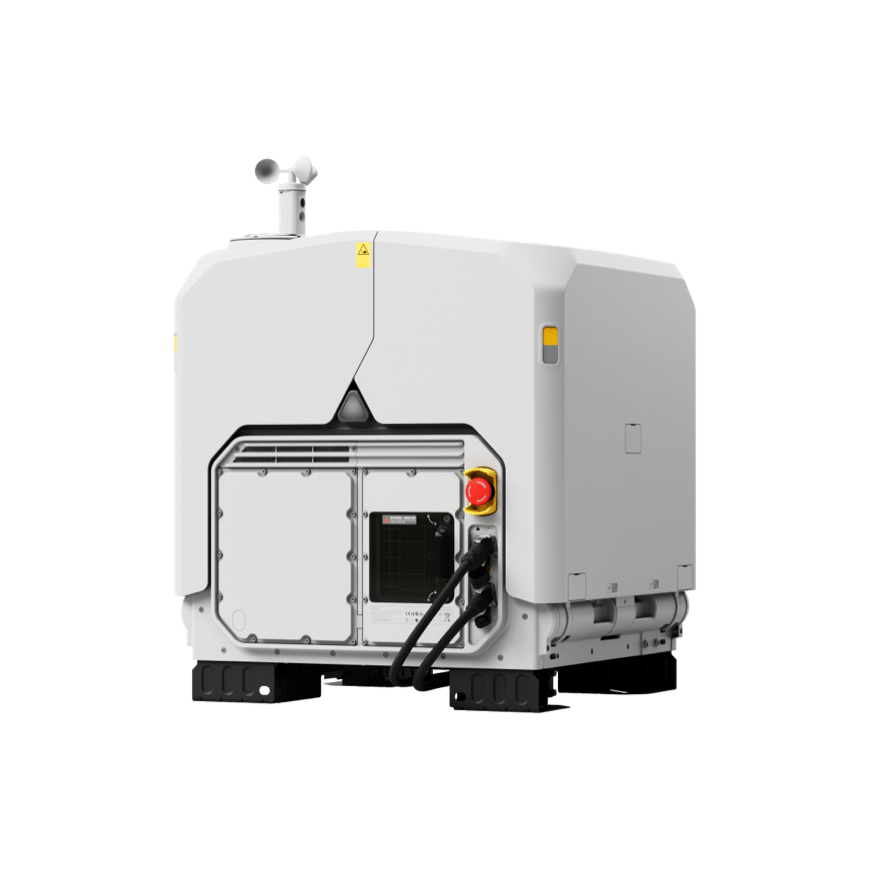
DJI Dock 3 vs. Dock 4: Full Specification and Operational Comparison
The biggest difference is not five extra minutes of headline flight time. It is what happens between flights: Dock 3 recharges the aircraft; Dock 4 removes the depleted battery and installs a charged one.
| Category | DJI Dock 3 | DJI Dock 4 | Operational Meaning |
|---|---|---|---|
| Paired aircraft | DJI Matrice 4D or Matrice 4TD | DJI Matrice 5TD only | Dock 3 lets buyers choose a mapping-oriented 4D or thermal 4TD. Dock 4 standardizes around one multi-sensor aircraft. |
| Between-flight servicing | Charges the aircraft battery from 15% to 95% in 27 minutes at 25°C | Automated battery swap in under 25 seconds; complete landing-to-relaunch interval under 45 seconds in controlled testing | Dock 4 sharply reduces the period when the aircraft is unavailable between missions. |
| Battery architecture | Aircraft remains in the dock while its installed battery charges | Four battery-compartment positions; up to three may be occupied so the exchange mechanism retains an empty position | Dock 4 rotates batteries through flight and charging instead of tying aircraft availability to the recharge cycle. |
| Parallel charging | Single aircraft battery in the dock | Up to two stored batteries charge simultaneously; 15% to 95% per battery in 27 minutes at 25°C | Charging can occur while the aircraft is already flying with another battery. |
| Maximum flight time | 54 minutes for Matrice 4D Series under DJI test conditions | 59 minutes for Matrice 5TD under DJI test conditions | Dock 4 adds endurance, but mission reserve, wind, temperature, payload and hover time reduce real-world duration. |
| Maximum operating radius | 10 km under specified test conditions | 10 km under specified test conditions | The headline radius is unchanged. Communications, regulations, terrain and battery reserve—not the brochure number—set the usable mission area. |
| Dock operating temperature | -30°C to 50°C | -40°C to 50°C | Dock 4 extends the lower limit by 10°C, a material advantage for northern and continental Canadian sites. |
| Aircraft operating temperature | -20°C to 50°C | -40°C to 50°C | The aircraft-side improvement is especially important: Dock 4's paired aircraft matches the dock's -40°C lower limit. |
| Weather protection | Dock IP56; Matrice 4D/4TD IP55 | Dock IP56; Matrice 5TD IP55 | Ingress-protection ratings remain comparable. They do not remove icing, visibility, precipitation or maintenance limits. |
| Wind | 12 m/s maximum allowable landing wind; aircraft resistance up to 12 m/s | 12 m/s maximum allowable landing wind; aircraft resistance up to 12 m/s | Dock 4 does not raise the published wind limit. Its advantage is response cadence and sensing, not a higher wind threshold. |
| RTK and primary radio | RTK and O4+ Enterprise video transmission integrated into the dock | RTK, video transmission, network access and processing moved into the required external DJI O4 Ground Station | Dock 4 lets the radio/RTK unit be positioned higher or in a clearer location than the dock itself. |
| Network options | Ethernet; optional 4G access using DJI Cellular Dongle 2 | Ethernet through O4 Ground Station; optional 4G access using DJI Cellular Dongle 2; private 4G enhanced transmission supported | Both require an engineered communications plan. Dock 4 adds more flexible radio placement and edge-processing options. |
| Mobile deployment | DJI expressly supports vehicle-mounted deployment with the approved configuration | DJI's published Dock 4 material emphasizes fixed installations and does not currently advertise Dock 3-style vehicle mounting | Dock 3 remains the clearer choice where approved mobile deployment is a core requirement. |
| Dock weight | 55 kg without aircraft | 66 kg without aircraft or stored batteries | Dock 4 requires a heavier-duty handling, mounting and installation plan. |
| Maximum input power | 800 W | 2,000 W | Remote solar, generator, UPS and electrical designs cannot simply reuse Dock 3 power assumptions. |
| Power-outage support | Internal lead-acid backup battery provides more than four hours for limited dock functions | Stored aircraft batteries can supply approximately 4.5 hours each, sequentially across up to three batteries, for limited dock functions and battery swaps | Dock 4 gains flexible backup capacity and can still exchange batteries during a grid outage, but it cannot charge them without external power. |
| Software ecosystem | FlightHub 2, FlightHub 2 On-Premises, FlightHub Sync and DJI Cloud API | FlightHub 2, FlightHub 2 On-Premises, FlightHub Sync, DJI Cloud API and the expanded DJI Enterprise app | The core remote-operations stack remains familiar, reducing software retraining for existing DJI programs. |
| Best fit | Scheduled inspections, repeat mapping, lower-cadence monitoring, vehicle-mounted response and cost-conscious automation | Urgent response, frequent patrols, severe cold, complex inspection, night operations and AI-assisted situational awareness | Select around the mission and required service level—not simply the newest product. |
The 25-second and 45-second numbers describe different events. DJI measures the physical battery exchange from the moment the dock cover is fully closed. The under-45-second turnaround measures the complete interval from landing after the previous flight to takeoff after the swap. Both were measured in controlled conditions.
What Dock 3 and Dock 4 Still Have in Common
Dock 4 is a major system change, but many fundamentals of a professional drone-in-a-box deployment remain the same.
One Docked Aircraft
Each dock accommodates one aircraft. A single site can support repeated missions, but it is not a redundant fleet by itself. Programs that require guaranteed coverage during maintenance or incidents should assess multi-dock or manual-aircraft backup.
FlightHub 2 Control Layer
Both use DJI FlightHub 2 for device health, mission planning, scheduled routes, live video, remote control, alerts, media management and operational records. Cloud, on-premises and integration options remain part of system design.
Weather Does Not Disappear
Both docks are IP56 and their paired aircraft are IP55, with 12 m/s published wind limits for relevant operations. Icing, heavy precipitation, visibility, temperature, lightning and site-specific turbulence still require operating limits and launch-inhibit logic.
10 km Published Radius
DJI lists a 10 km maximum operating radius for both aircraft families under defined test conditions. The usable Canadian mission envelope may be smaller because of reserve policy, terrain, radio obstruction, airspace and regulatory conditions.
400 × 400 mm Mounting Pattern
DJI confirms that Dock 3 and Dock 4 share the same mounting-hole pattern. That may simplify a site upgrade, but Dock 4's higher weight, 2,000 W input, external O4 Ground Station and different clearances still require a new engineering review.
Program Work Still Matters
Hardware does not replace pilot qualifications, operational control, emergency procedures, aircraft eligibility, maintenance, cybersecurity, data governance, airspace assessment or the need to turn imagery into an operational result.
Why the Battery-Swapping System Is the Real Game Changer
Dock 3 automates a flight cycle. Dock 4 is designed to automate a higher-tempo service—especially when the value of the next flight falls rapidly with every minute of delay.
With Dock 3, the aircraft returns, lands and waits while the installed battery recharges. DJI lists 27 minutes to charge from 15% to 95% at 25°C. That interval is perfectly acceptable for hourly inspections, daily stockpile surveys, weekly construction mapping or routine perimeter patrols.
It is more limiting during an unfolding emergency. If a thermal patrol identifies a hotspot, a security event escalates, a second incident occurs or a command team needs another viewpoint immediately, the aircraft may be unavailable while charging. Dock 4 removes that bottleneck by transferring a charged battery into the Matrice 5TD and moving the depleted battery into the charging cycle.
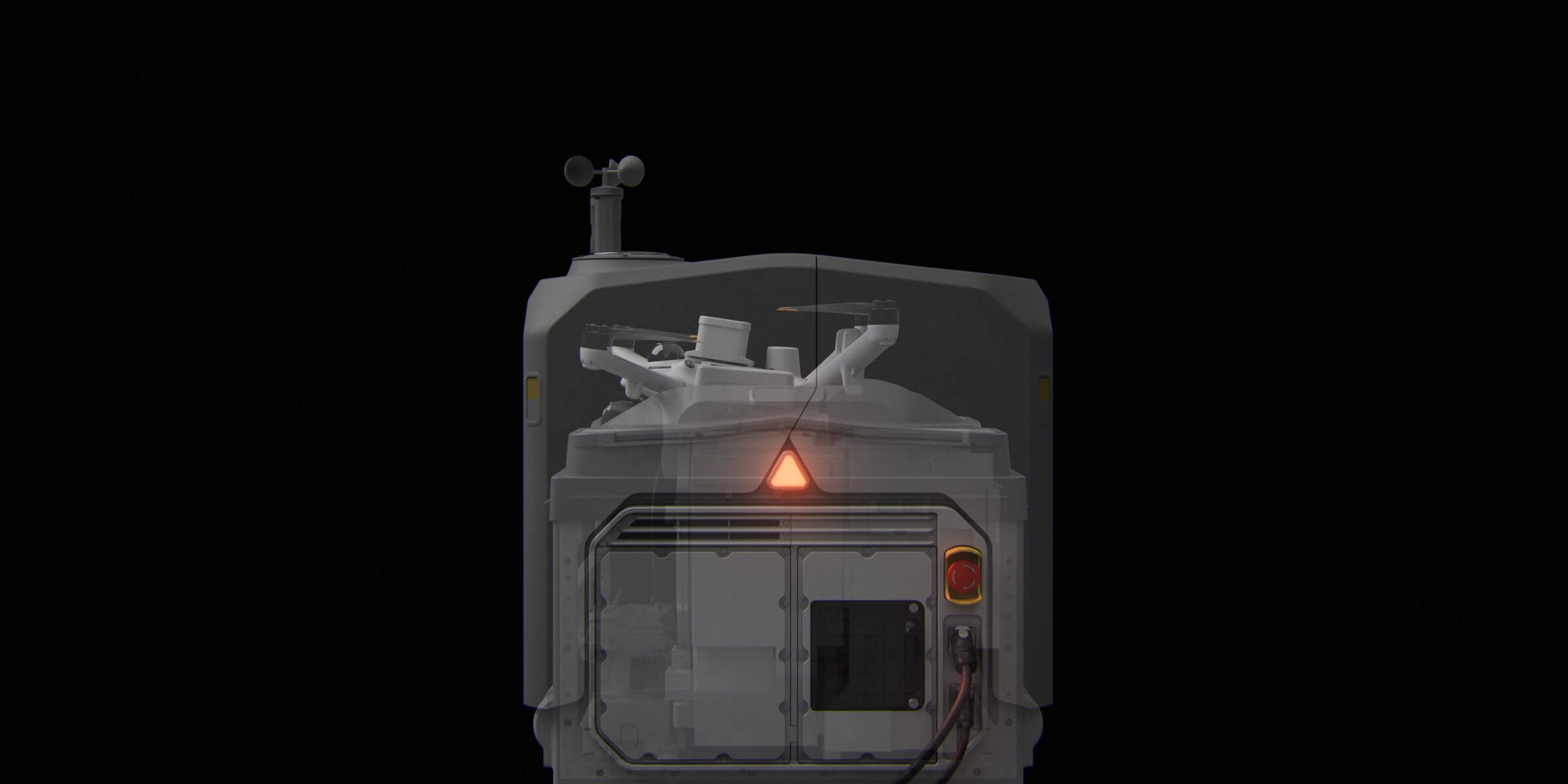
How the Dock 4 battery cycle works
Aircraft returns and lands
The Matrice 5TD uses RTK, LiDAR, visual SLAM and the dock's landing markers to complete the return and precision landing sequence.
Dock closes and evaluates battery state
DJI states that the automatic exchange is triggered after a mission when the aircraft battery is below 79%. Operators can also command a manual swap through FlightHub 2 or the DJI Enterprise app.
Automated exchange completes in under 25 seconds
The dock removes the depleted aircraft battery, rotates the internal battery mechanism and installs a charged battery. No technician needs to be physically present for the normal exchange.
Aircraft can relaunch in under 45 seconds from landing
The urgent mission can resume while the returned battery begins charging. Two batteries can charge simultaneously, and each requires approximately 27 minutes from 15% to 95% at 25°C.
What “24/7” should mean in a real deployment
Dock 4 can support round-the-clock availability and much higher mission cadence, but one dock does not provide literally continuous airborne coverage. There is still one aircraft. Flight time, reserve, weather, charging balance, maintenance, radio performance, airspace, regulatory conditions and human oversight remain part of the service level.
The stronger business case is always-ready aerial support: after a flight, the next mission can begin in seconds rather than waiting for an aircraft battery to recharge. That difference is decisive for dock-as-first-responder programs, active security incidents, wildfire overwatch, search operations, repeated thermal checks and inspections that require fast verification from a second angle.
Design implication: Battery swapping increases site electrical demand and mechanical complexity. Dock 4 has a maximum 2,000 W input compared with 800 W for Dock 3. Remote power systems, winter heating loads, UPS capacity, spare-battery policy and preventive maintenance should be sized around the intended mission cadence—not the average mission alone.
Site Survey, Environmental Mapping and Precision Landing
DJI documents two separate functions that are sometimes blended together in product discussions: the installation survey used to place the O4 Ground Station, and the aircraft's local environmental mapping used for precision landing.
O4 Ground Station Site Survey
The O4 Ground Station should be placed in an elevated, open and unobstructed position with suitable GNSS and radio conditions. DJI instructs installers to survey the proposed location with a current Matrice 4 Series or Matrice 4D Series aircraft before permanent installation.
This survey helps validate a candidate communications position instead of assuming that the best place for the dock is also the best place for the radio and RTK base station.
LiDAR and Visual-SLAM Landing Map
During return, the Matrice 5TD first navigates toward the departure point using RTK. It then uses LiDAR and visual simultaneous localization and mapping—visual SLAM—to build a local environmental map. The aircraft combines that map with the visual markers on the dock landing pad for final positioning and landing.
This improves local awareness and landing precision in a way that goes beyond relying only on satellite positioning.
About the “50 × 50 metre scan” description: DJI's currently published Dock 4 specifications and FAQ do not define a guaranteed 50 × 50 metre self-mapped landing area. The verified functions are the pre-installation O4 Ground Station survey and the Matrice 5TD's RTK, LiDAR and visual-SLAM environmental mapping for precision landing. Site plans should use DJI's installation manual and field survey results, not an unverified fixed-area claim.
DJI O4 Ground Station: Why Separating the Radio from the Dock Matters
Dock 4 cannot operate without the DJI O4 Ground Station. DJI moved video transmission, RTK, network access and processing into a separate required unit that can be positioned for better sky view and radio geometry.
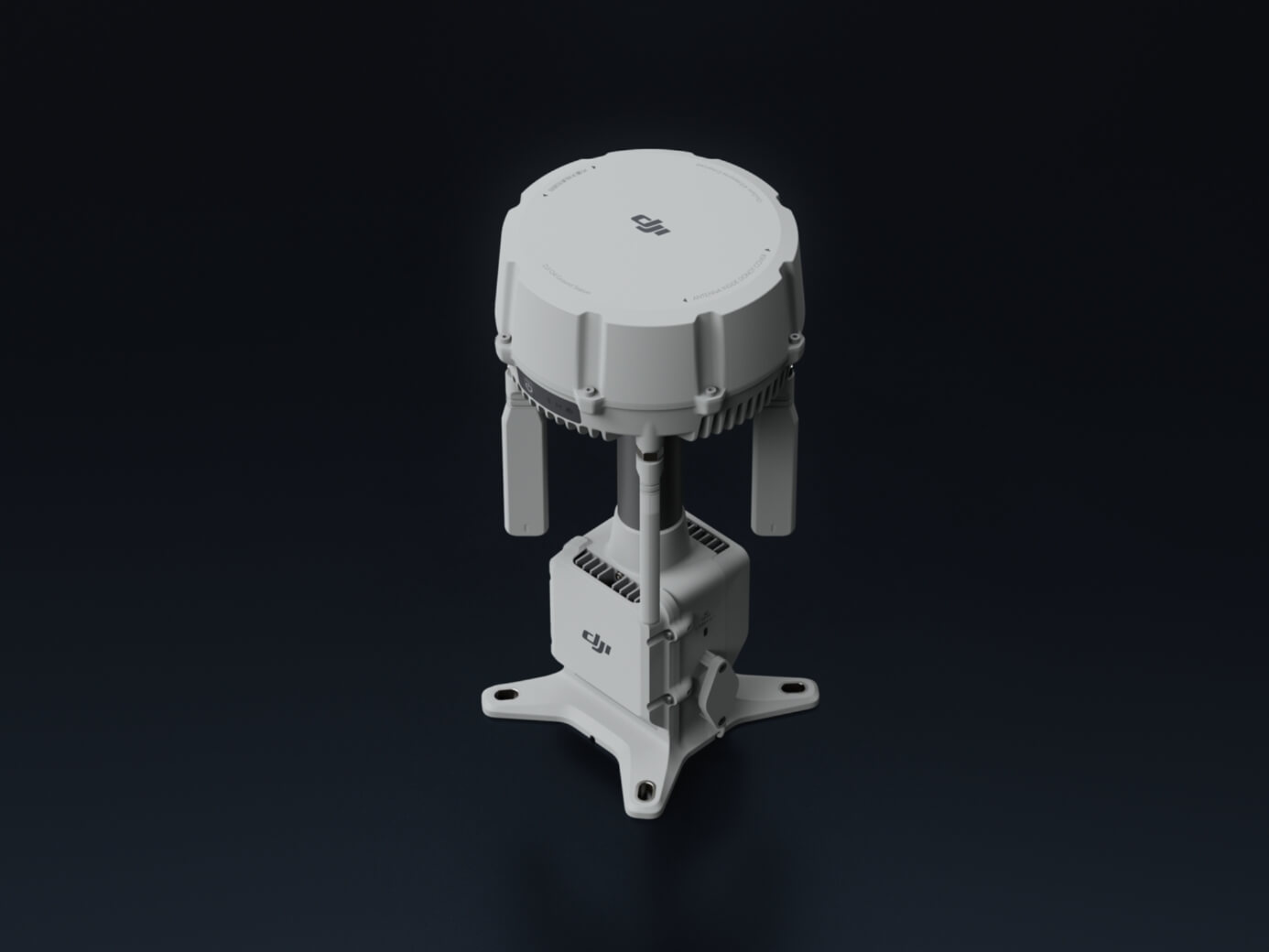
Place the communications point where it performs best
The O4 Ground Station connects to Dock 4 by Ethernet with Power over Ethernet. DJI allows a cable run from 1.5 to 80 metres. This lets installers keep the dock at the safest launch-and-landing location while mounting the communications and RTK unit higher, farther from metal obstructions or above a wall that would otherwise block the signal.
Radio, RTK, network and processing in one station
The O4 Ground Station provides DJI O4 Enterprise Enhanced video transmission, RTK base-station capability, network connectivity and data processing. It is IP67-rated and supports cold-weather heating when powered from Dock 4.
Designed for obstructed and interference-prone sites
DJI added sub-2 GHz support in eligible regions and built dual 4G enhanced transmission modules into Matrice 5TD. The system also supports private 4G enhanced video transmission. Frequency availability, carrier support and performance vary by region and must be confirmed for the Canadian deployment.
Connect local processing and fixed cameras
The station supports edge computing through an external switch and can accept up to four simultaneous 1080p H.264 streams from compatible IP cameras using ONVIF or GB/T 28181 protocols. A command centre can combine aerial and fixed-site views inside a broader response workflow.
Does the O4 Ground Station extend BVLOS range?
It can materially improve the command-and-control architecture by letting the primary radio sit in a stronger location and by supporting additional transmission paths. DJI publishes long transmission distances under specified test conditions, while the Matrice 5TD's energy-based maximum operating radius remains 10 km.
Those figures do not create regulatory authority to fly BVLOS. A reliable link is one element of an operating concept. The approved mission also depends on the pilot certificate, operator certificate, aircraft declaration, airspace, population exposure, aerodrome proximity, procedures, contingency planning and any required authorization.
Important distinction: Better signal coverage can make a proposed BVLOS mission technically feasible. It does not make the mission legally authorized. Radio-link design and regulatory pathway must be assessed together.
Matrice 5TD vs. Matrice 4D / 4TD: A Different Kind of Dock Aircraft
Dock 4 is compatible only with Matrice 5TD. Its value comes from combining several day, night, thermal, ranging and obstacle-sensing functions in one airframe.
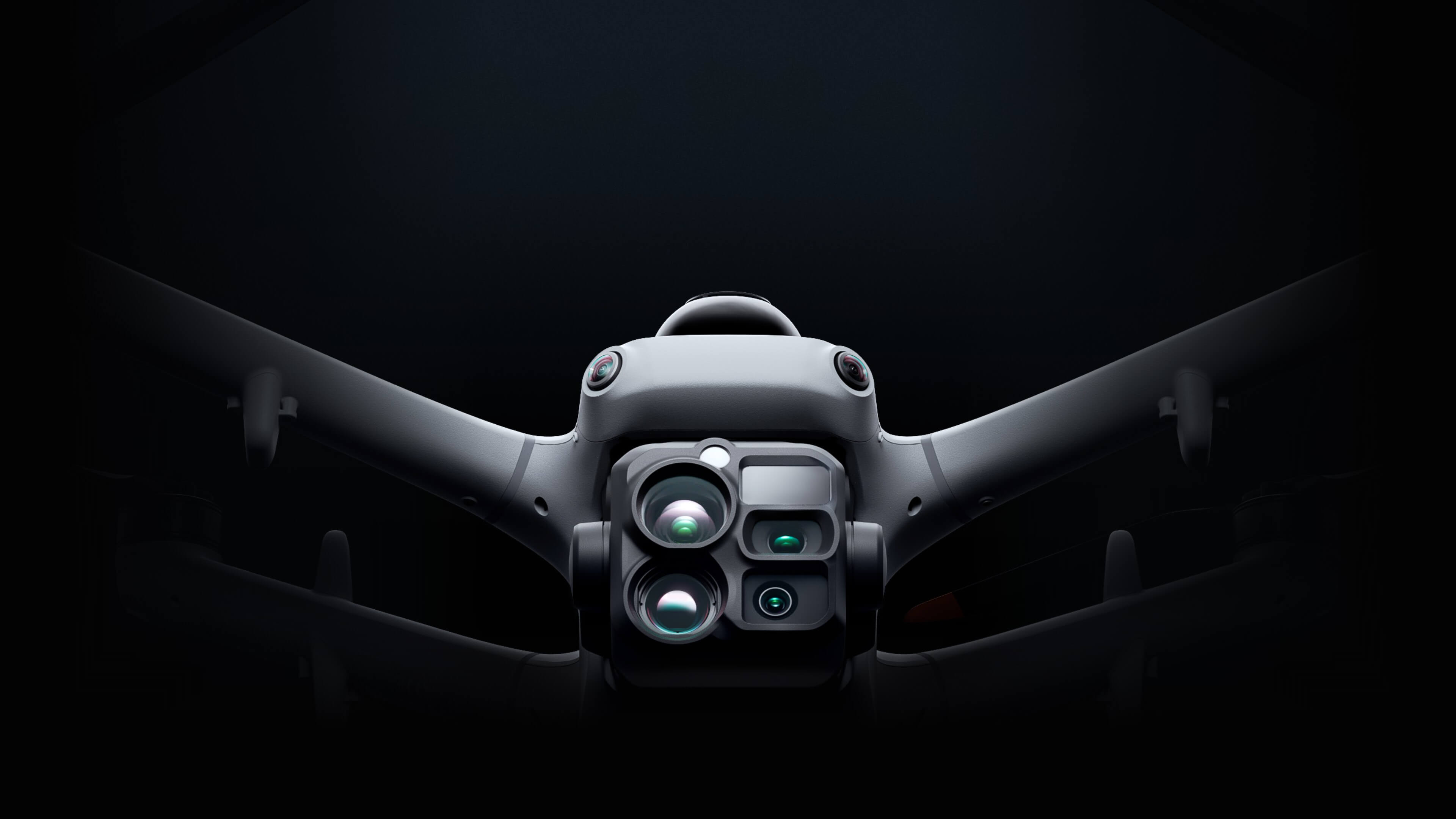
Three 50 MP Visible Cameras
Matrice 5TD uses 50 MP wide, medium-tele and tele cameras. The 252 mm-equivalent tele camera provides 11× optical reach and up to 176× hybrid zoom, supporting distant inspection and situational awareness.
1280 × 1024 Thermal
The native thermal imager is 1280 × 1024 at 30 Hz, with a 2560 × 2048 ultra-high-resolution infrared mode, visible-thermal fusion and radiometric JPEG output for inspection and incident analysis.
3 km Laser Rangefinder
The laser rangefinder can measure to 3,000 m under DJI's specified conditions, supporting remote coordinates, distance measurements and target localization for inspections, wildfire assessment and emergency response.
LiDAR + mmWave Radar
A rotating LiDAR, three-directional millimetre-wave radar, six-direction vision and downward infrared sensing provide a more capable obstacle-awareness stack, including wire-level sensing under specified conditions.
Night and Low-Light Operations
High-sensitivity full-colour cameras, NIR illumination support and thermal imaging allow the same aircraft to cover daylight inspection, night security and thermal response without changing airframes.
Accessories and Payload Capacity
Matrice 5TD provides three mounting interfaces and supports up to 450 g of accessories or third-party payloads. DJI offers compatible speaker, spotlight and parachute options; availability and functions vary by region.
Where Dock 3 can still have an aircraft advantage
Dock 3 supports either Matrice 4D or Matrice 4TD. Matrice 4D includes a mechanical shutter and is purpose-built for repeat mapping and photogrammetry. Organizations focused primarily on scheduled topographic capture, stockpile volumes, construction progress or other mapping work may prefer that dedicated configuration over buying a more complex thermal multi-sensor platform.
Matrice 4TD remains a strong thermal and inspection aircraft with a lighter 1.85 kg airframe, while Matrice 5TD weighs 2.6 kg and emphasizes broader sensing, endurance, cold-weather operation and rapid-response versatility.
FlightHub 2 and the AI-Powered Operating Workflow
Battery swapping only creates value when the alert, dispatch, live view, decision and follow-up workflow are equally fast. DJI FlightHub 2 is the operating layer that connects those steps.
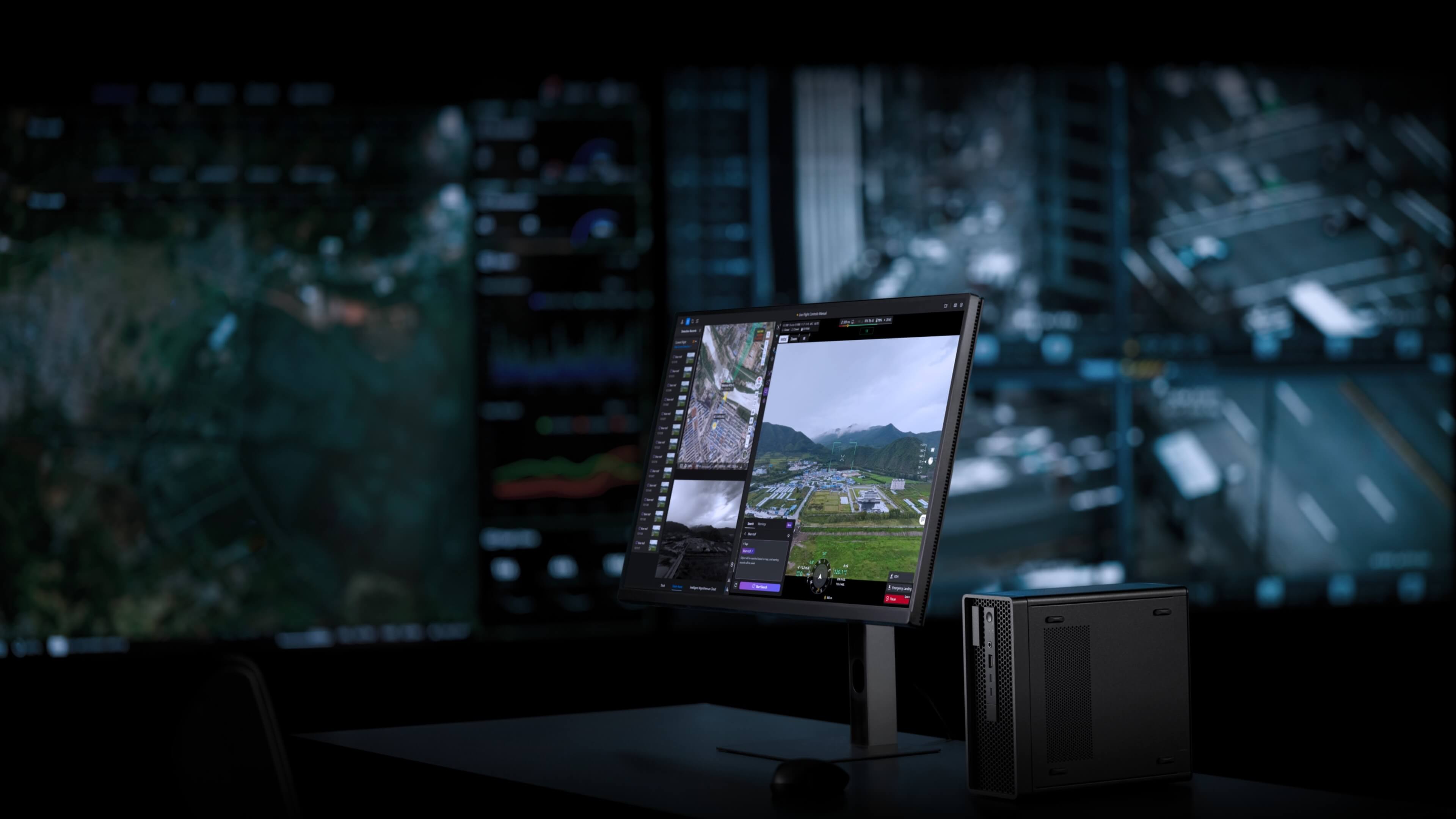
Remote Operations
- Scheduled routes and repeat missions
- One-tap dispatch and FlyTo tasks
- Remote live view and virtual cockpit
- Device health, weather and dock-status monitoring
- Manual or automated battery exchange control
- Centralized media, telemetry and mission records
Dock 4 Intelligence
- Onboard recognition of 17 object types, with DJI examples including cars, boats and animals
- Text- or image-based object search inside FlightHub 2 Virtual Cockpit
- SMS, email or platform notifications for configured events
- Automated actions such as snapshots, recording, tracking or hovering
- Real-time AI detection on live video
- High-speed Wi-Fi QuickTransfer after landing
For an enterprise program, the important design question is not whether FlightHub 2 can schedule a route. It is what happens after the system finds something. A useful implementation defines who receives the alert, what evidence they see, how it is verified, whether another flight is launched, how the event is documented and what maintenance, security or emergency workflow is triggered.
FlightHub 2 Public Cloud is not the only architecture. DJI also lists FlightHub 2 On-Premises, FlightHub Sync and Cloud API support for Dock 4. Data residency, cybersecurity, identity management, logging, retention and third-party-system integration should be decided during solution design rather than after hardware installation.
Where Dock 4 Changes the Business Case
The strongest Dock 4 applications are those where response time, second sorties, night capability, severe weather tolerance or multi-sensor evidence materially change the operational outcome.
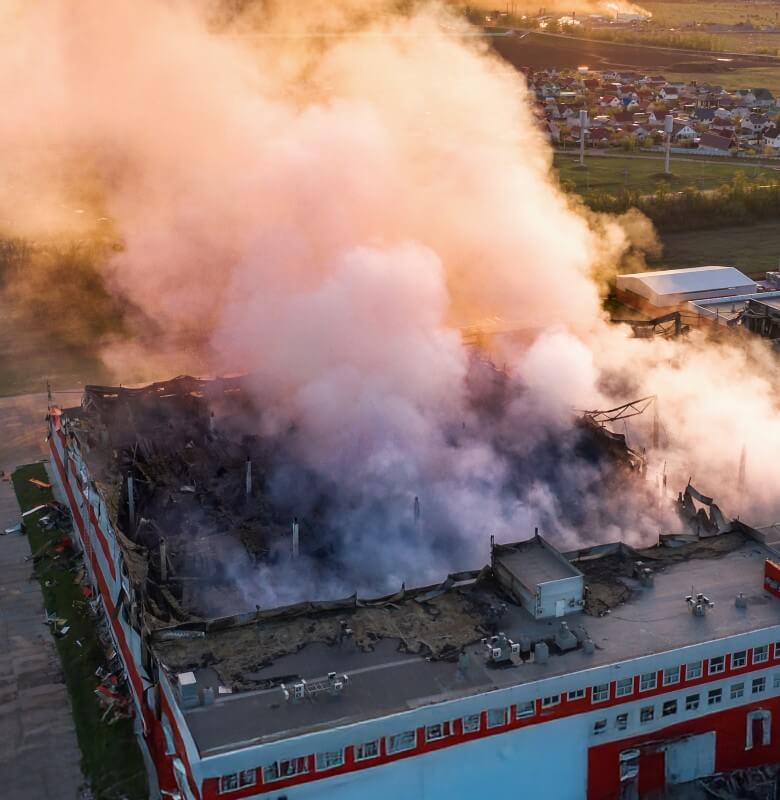
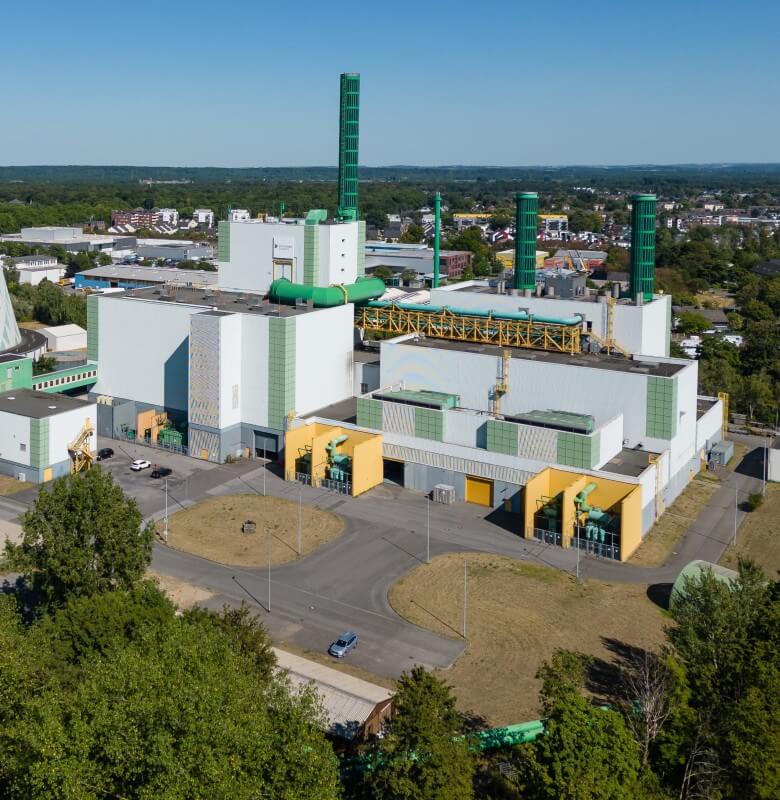

From scheduled survey tool to persistent site-intelligence system
Dock 3 with Matrice 4D remains an excellent configuration for routine stockpile measurements and progress mapping. Dock 4 adds value when the same site also needs rapid incident response, night security, thermal checks of plant equipment, tailings-area observation, haul-road monitoring or repeat inspection after a finding.
The fast battery cycle can support a new mission while previous batteries charge, which is useful on large mine sites where repeated flights are needed to cover multiple operational zones.
Remote infrastructure checks and incident verification
Potential workflows include right-of-way patrols, tank-farm monitoring, flare and equipment thermal inspection, perimeter security and rapid visual verification after an alarm. The O4 Ground Station can be located to improve communications around walls, structures or uneven terrain.
Matrice 5TD's thermal camera is not a substitute for a dedicated optical gas-imaging or chemical sensor. If leak detection is part of the mission, the payload and detection method must be specified separately.
Dock as First Responder
Dock 4 can launch a Matrice 5TD as soon as the cover opens and send it toward an incident at up to 21 m/s for supported FlyTo tasks. Police, fire, search-and-rescue and emergency-management teams can receive live visible and thermal context before or alongside ground crews.
The 25-second battery exchange is especially valuable when an incident outlasts one battery or a second emergency occurs during the recharge window.
Rapid alarm verification and repeat patrols
Critical infrastructure, industrial campuses, ports, correctional facilities and remote compounds can use scheduled patrols plus event-driven dispatch. Onboard AI can support detection and search for configured object types, while visible, thermal and night capabilities help maintain awareness across changing lighting conditions.
Aerial security should be integrated with fixed cameras, access control, alarm management and a defined human decision process—not operated as a disconnected video feed.
Complex-site and thermal inspection
LiDAR, mmWave radar and wire-level obstacle sensing under qualifying conditions support operations around substations, distribution infrastructure and other obstacle-rich sites. The 11× telephoto, 1280 × 1024 thermal sensor and 3 km laser rangefinder allow useful stand-off inspection and target localization.
Operators must still define safe routes, minimum distances, electromagnetic-interference considerations and confirmation methods for any detected anomaly.
Frequent change capture and rapid inspection
Dock 4 can support recurring progress capture, structural observation, emergency inspection and up to 10 cm aerial survey accuracy at 12 MP under DJI's stated conditions. Its fast turnaround matters on very large sites or when a finding triggers an immediate follow-up flight.
For dedicated high-volume photogrammetry where response time and thermal data are secondary, Dock 3 with Matrice 4D's mechanical shutter may remain the more efficient choice.
Which Platform Should Your Organization Choose?
The right answer depends on required service level, mission payload, environment, deployment model, communications and total program cost.
Dock 3 is likely the better fit when:
- Missions are scheduled and a 27-minute charging interval is acceptable.
- Vehicle-mounted deployment is a primary requirement.
- Matrice 4D's mechanical shutter and mapping role are central to the program.
- The site electrical budget favours an 800 W maximum input.
- The operating environment remains within the dock's -30°C and aircraft's -20°C limits.
- A mature, lower-complexity automation platform meets the required outcome.
Dock 4 is likely the better fit when:
- Minutes of aircraft unavailability affect safety, response or production.
- Several missions may be required back-to-back.
- Operations must be designed for ambient temperatures down to -40°C.
- Visible, thermal, night, telephoto, LiDAR, radar and laser-ranging capabilities are needed on one aircraft.
- The O4 Ground Station's separate placement solves a difficult communications or RTK site.
- AI-assisted detection and alert-driven dispatch are part of the operational concept.
- The organization is building a dock-as-first-responder, continuous-security or urgent remote-inspection service.
Do not compare hardware price alone. Model the cost of response delay, avoided travel, on-site labour, data processing, connectivity, electrical work, foundations, winterization, regulatory preparation, training, software, maintenance, spares and operational coverage. The more urgent the mission, the more valuable Dock 4's turnaround becomes.
Deploying DJI Dock 3 or Dock 4 in Canada
A communications range specification is not a Canadian operating approval. The mission must fit the applicable Transport Canada category and the organization's approved operating system.
The dock does not decide the category
A Dock mission conducted within visual line of sight may fit the applicable Basic or Advanced rules when all aircraft, airspace, people and operational conditions are satisfied. A remote or automated workflow does not automatically make every flight BVLOS, and buying the hardware does not determine the certificate pathway.
Routine lower-risk BVLOS has a defined pathway
Since November 4, 2025, qualifying lower-risk BVLOS operations can be conducted under Canada's Level 1 Complex framework. The operating envelope includes prescribed airspace, altitude, aerodrome, population and distance conditions. The pilot needs the appropriate certificate and must operate under an RPOC.
Higher-risk or out-of-envelope missions still need permission
An SFOC remains necessary when the proposed operation falls outside the Basic, Advanced or Level 1 Complex rules. Controlled airspace, higher ground risk, unsuitable aircraft declarations, more complex operating concepts or other conditions may change the pathway.
Verify the exact model and declared capability
Transport Canada's safety-assurance declaration must match the intended operation—not merely the aircraft brand or a generic “enterprise” description. Because Matrice 5TD and Dock 4 are newly released, buyers should verify the current Canadian declaration and permitted capabilities before relying on a specific regulatory pathway.
A Canadian Dock readiness assessment should cover:
Site and Technical Readiness
- Mission, coverage area and required response time
- Dock 3 vs. Dock 4 platform selection
- Foundation, drainage, clearance and physical security
- Power, backup power and winter heating load
- O4 Ground Station survey, GNSS and radio path
- Primary and backup network architecture
- FlightHub 2, data storage and system integrations
Operational and Regulatory Readiness
- VLOS, Level 1 Complex or SFOC pathway
- Aircraft declaration and exact operating capability
- Pilot qualifications and RPOC requirements
- Airspace, aerodrome and ground-risk assessment
- Lost-link, weather and emergency procedures
- Maintenance, battery and inspection program
- Training, drills, logs and continuing oversight
Plan the authorization and system together. The safest and fastest implementation sequence is mission definition, site and risk assessment, regulatory pathway, communications and power design, hardware selection, installation, acceptance testing, crew training and measured operational rollout.
Unmanned Canada Dock 3 and Dock 4 Program Implementation
A successful remote-operations program requires one accountable partner across solution design, procurement, installation, software, training and lifecycle support.
Unmanned Canada is Canada's #1 DJI Authorized Dealer and a Certified DJI Dock 4 Dealer and Installer. We support enterprise, industrial and public-sector clients across Canada with complete DJI Dock deployment programs—not only hardware supply.
Our team is well versed in remote DJI deployments for mining, oil and gas, utilities, infrastructure, public safety, emergency response and security. We can help determine whether Dock 3 or Dock 4 is the better operational and financial fit, then coordinate the supporting work required to move from a product purchase to a functioning program.
Plan and Design
- Mission and workflow discovery
- Dock 3 vs. Dock 4 selection
- Site assessment and O4 survey planning
- Power, network and security architecture
- BVLOS, RPOC and SFOC readiness support
- FlightHub 2 and data-flow design
Deploy and Sustain
- Authorized equipment procurement
- Certified Dock 4 installation
- Configuration and commissioning
- Acceptance testing and documentation
- Pilot, administrator and operations training
- Maintenance, warranty and technical support
Frequently Asked Questions
Practical questions from Canadian organizations comparing DJI Dock 3 and Dock 4.
Does DJI Dock 4 swap batteries in 25 seconds or 45 seconds?
Both figures are correct but measure different events. DJI states that the automated battery exchange takes less than 25 seconds from the moment the dock cover is fully closed. The complete operational turnaround—from the aircraft landing after one flight to taking off after the swap—can be less than 45 seconds in controlled testing.
Can DJI Dock 4 really operate 24/7?
Dock 4 is designed for round-the-clock availability and high-cadence missions. Battery swapping prevents the aircraft from waiting through a normal recharge cycle, while up to two stored batteries can charge simultaneously. It does not mean one aircraft stays airborne continuously. Weather, charging balance, maintenance, network availability, airspace, regulation and human oversight still limit operations.
How many batteries does DJI Dock 4 hold?
The dock has four battery-compartment positions, but DJI permits no more than three of them to contain batteries at one time. The empty position is required for the swapping mechanism. The aircraft carries another battery during flight.
Can Dock 4 use Matrice 4D or Matrice 4TD?
No. DJI states that Dock 4 is compatible only with Matrice 5TD. Dock 3 uses Matrice 4D or Matrice 4TD. The aircraft choice is therefore part of the dock-platform decision, not a component that can be mixed freely across generations.
What is the built-in site survey or mapping feature?
There are two relevant features. Before installation, DJI instructs installers to use a supported Matrice 4 or Matrice 4D Series aircraft to survey candidate O4 Ground Station locations. During return and landing, Matrice 5TD uses RTK, LiDAR and visual SLAM to build a local environmental map and combine it with the landing-pad markers for precise positioning. DJI's published specifications do not define a guaranteed 50 × 50 metre mapping area.
Why is the DJI O4 Ground Station required?
Dock 4 moves its video-transmission, RTK, network and processing functions into the separate O4 Ground Station. It can be installed between 1.5 and 80 metres from the dock using the appropriate Ethernet/PoE connection, allowing the communications point to be placed higher or with a clearer view than the dock. Dock 4 cannot operate without it.
Does the O4 Ground Station automatically authorize BVLOS?
No. It can improve technical link performance and deployment flexibility, but Transport Canada authorization depends on the full operating concept. A qualifying lower-risk operation may fit Level 1 Complex under an RPOC; an operation outside that envelope may require an SFOC. The aircraft's safety-assurance declaration must also match the intended operation.
Is Dock 4 better than Dock 3 for mapping?
Not automatically. Dock 4 and Matrice 5TD add endurance, faster turnaround and broader sensing. Dock 3 can pair with Matrice 4D, which includes a mechanical shutter and is specifically positioned for mapping. A dedicated, scheduled photogrammetry program may still favour Dock 3; a mixed inspection, thermal, security and rapid-response program may favour Dock 4.
Is Dock 4 better for Canadian winters?
Dock 4 has the stronger published cold-temperature envelope. The dock and Matrice 5TD are rated from -40°C to 50°C. Dock 3 is rated from -30°C to 50°C, while Matrice 4D/4TD are rated from -20°C to 50°C. Ratings do not authorize flight in icing or remove the need for snow clearing, weather limits, battery conditioning and site-specific procedures.
Can an existing Dock 3 site be upgraded directly to Dock 4?
The two docks share a 400 × 400 mm mounting-hole pattern, which may help. It is not a drop-in assumption: Dock 4 is heavier, has a 2,000 W maximum input, requires the separate O4 Ground Station and has different battery, cable, network and site-survey requirements. The foundation, power, drainage, clearances, grounding, network, radio path and operating procedures should all be revalidated.
Can Unmanned Canada install and support DJI Dock 4?
Yes. Unmanned Canada is a Certified DJI Dock 4 Dealer and Installer and supports complete remote-deployment programs across Canada. Services can include mission definition, site assessment, equipment selection, power and communications planning, regulatory readiness, installation, FlightHub 2 setup, training, acceptance testing and lifecycle support.
Build the Right DJI Dock Program—Not Just the Newest Hardware Package
Book a DJI Dock deployment assessment with Unmanned Canada. We will review the mission, site, operating tempo, payload, Canadian regulatory pathway, communications, power, software and data workflow before recommending Dock 3 or Dock 4.
Unmanned Canada Support
- Certified DJI Dock 4 dealer and installer
- Dock 3 and Dock 4 program design
- Site, O4, power and network planning
- FlightHub 2 and data integration
- BVLOS and regulatory readiness support
- Training, commissioning and lifecycle service
Primary Sources
Technical claims were checked against current DJI product, specification and support material, with Canadian regulatory context linked separately.
- DJI Dock 4 product page
- DJI Dock 4 specifications
- DJI Dock 4 FAQ
- DJI Dock 4 launch announcement
- DJI Dock 4 accessory information
- DJI O4 Ground Station specifications
- DJI Dock 3 specifications
- DJI Dock 3 FAQ
- Transport Canada — Level 1 Complex operations
- Transport Canada — RPAS Operator Certificate
- Transport Canada — Special drone operations and SFOC—RPAS
Specifications, software functions, frequency availability, aircraft declarations, accessory availability and regulatory requirements can change. DJI performance values are based on stated test conditions and are not guarantees of field performance. This article is general planning information, not legal advice, an aviation authorization or a substitute for the applicable manuals, safety guidance and Canadian Aviation Regulations. Confirm the exact system configuration and operational pathway before deployment.
